A dashboard for multi-store commerce.
I built NyxBoard around the orders queue: filter across stores, inspect an order without losing your place, and see a status change reflected across the dashboard.
- Year
- 2026
- Type
- Personal Project
- Core Stack
- React + TypeScript
- Focus
- Operational UI & State Design
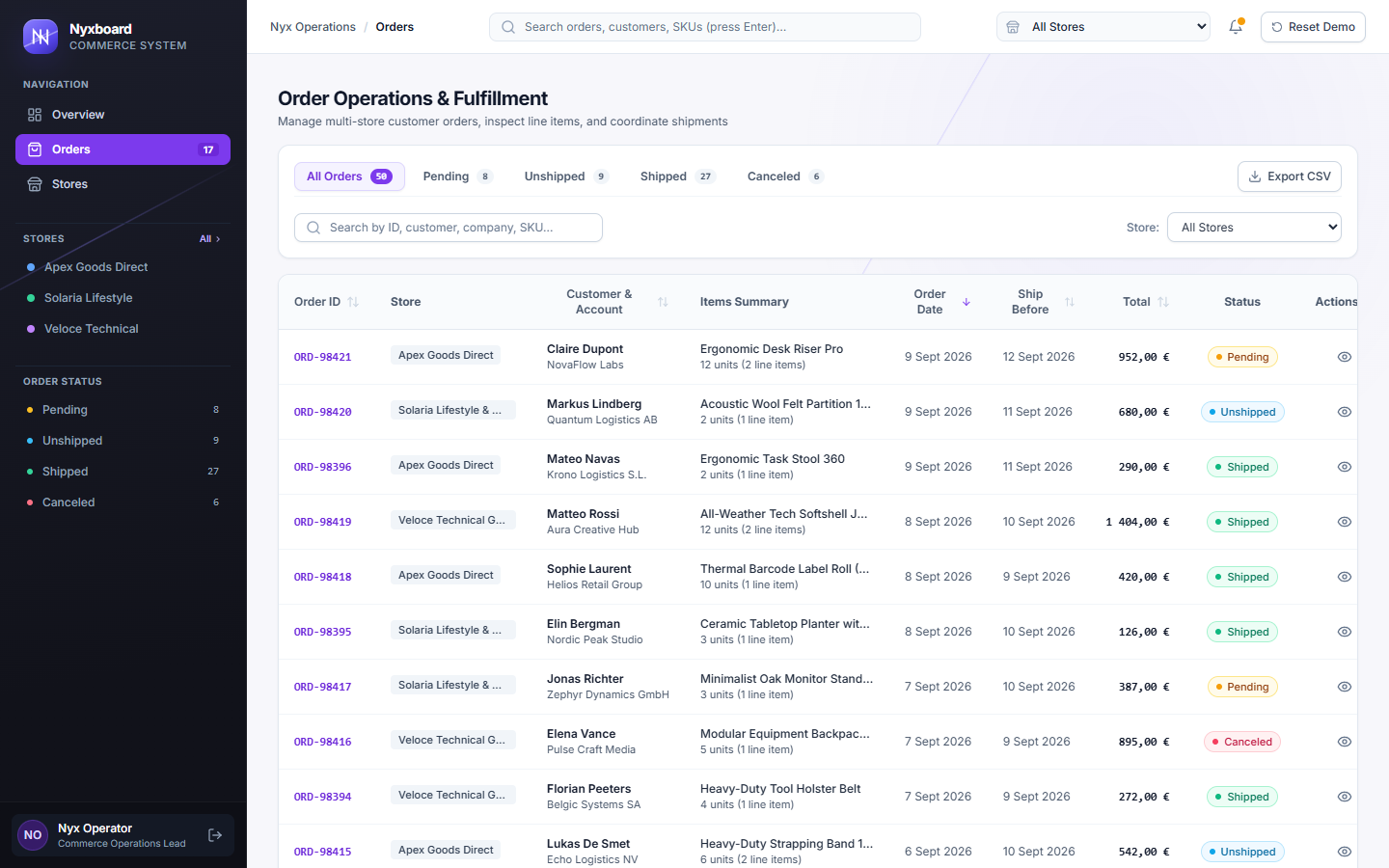
Awaiting an operations decision before fulfillment proceeds.
Order is active and awaiting fulfillment work.
Dispatched with tracking assigned; shipped count increments and fulfillment rate rises.
Marked canceled and excluded from active revenue calculations.
Keeping the dashboard from becoming a mess
NyxBoard has a lot going on: filters, sorting, order details, status updates, and multiple stores. The problem was making all of that usable without cramming everything into the screen.
So I kept most actions in the same workspace. You can filter orders, open one, check the details, update its status, and keep going without jumping between pages or losing where you were.
The Operations Overview
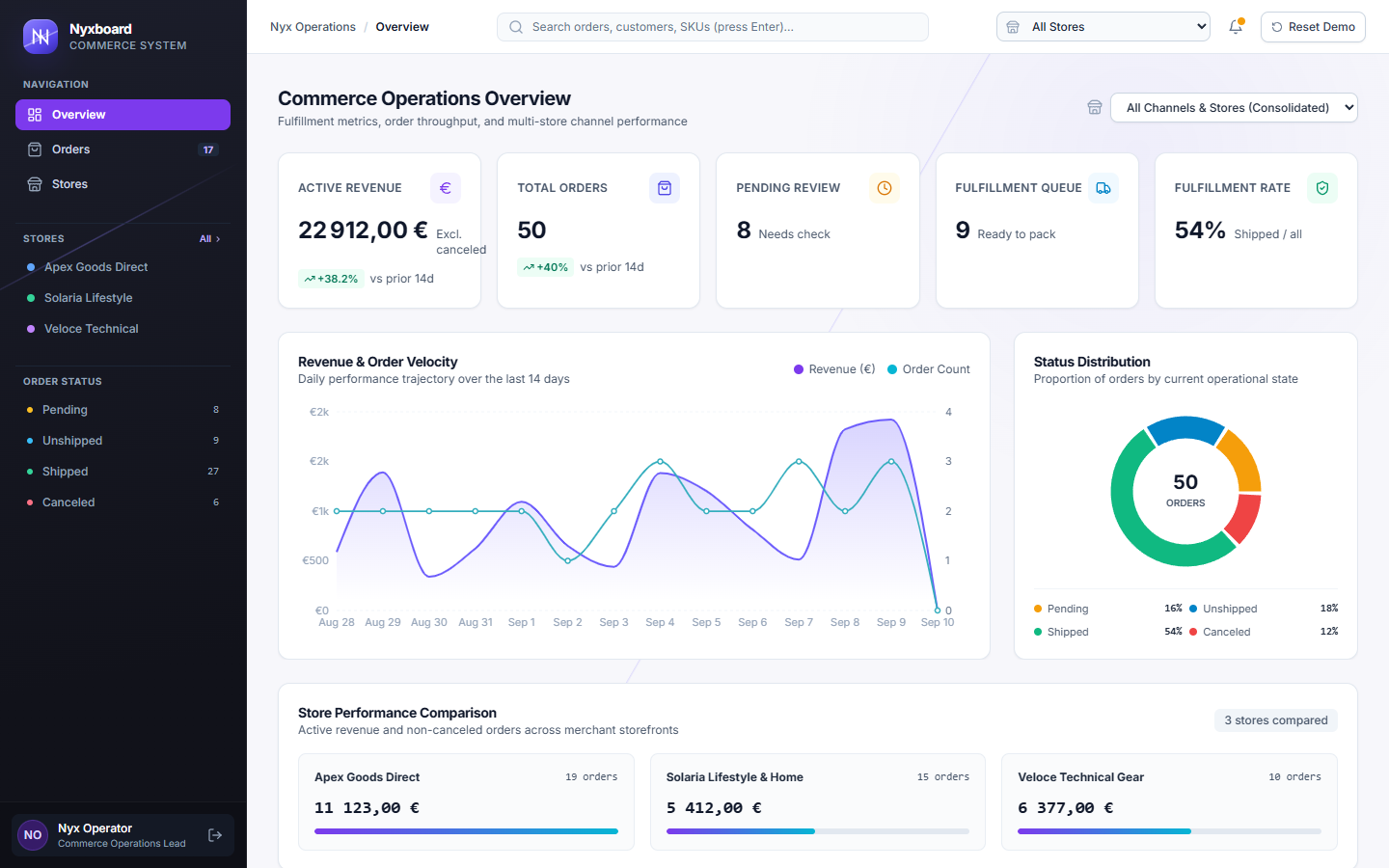
The overview and queue use the same saved order state. Cancelled orders drop out of active revenue.
Store Filtering
Switching stores scopes the dashboard without breaking the comparison between them.
Fulfillment Health
The top row keeps the numbers that need attention first: revenue, total orders, pending review, queue size, and fulfillment rate.
Volume & Distribution
Shipping an order changes the status split, while the 14-day revenue trend stays the same.
Synchronized Metrics
The overview and queue use the same saved order state. Cancelled orders drop out of active revenue.
The Orders Workspace
Search, store, status, sort, and page state live in the URL. Refreshing or sharing the workspace keeps the same view instead of sending you back to the full orders list.
Opening a separate order page would throw away the exact filter and scroll position that got you there. NyxBoard keeps the list in place and opens the order in a drawer, so review and fulfillment happen without leaving the queue.
Filtered Context
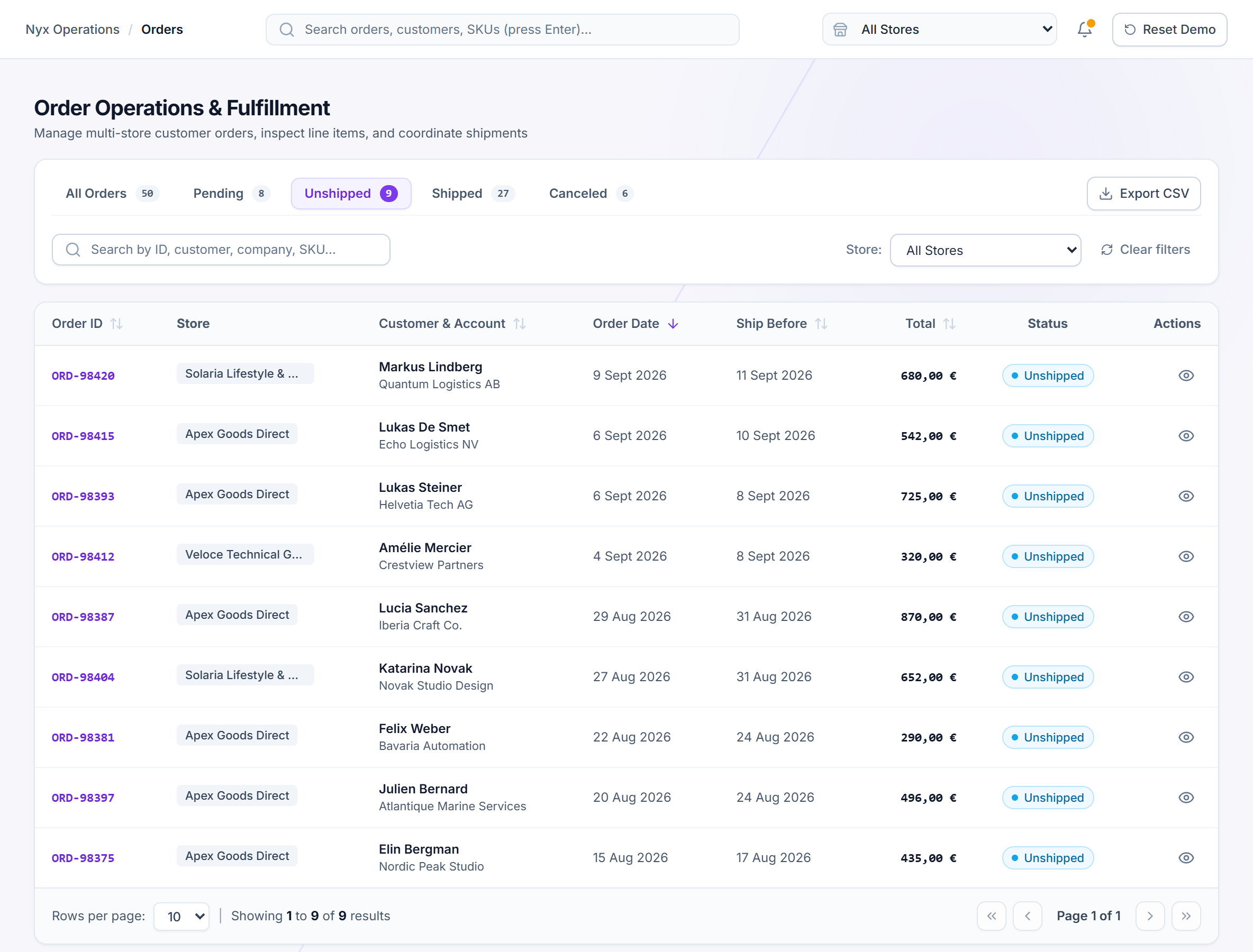
The Unshipped view narrows the list to orders that still need action, while the active filters stay in the URL.
Inspect in Place
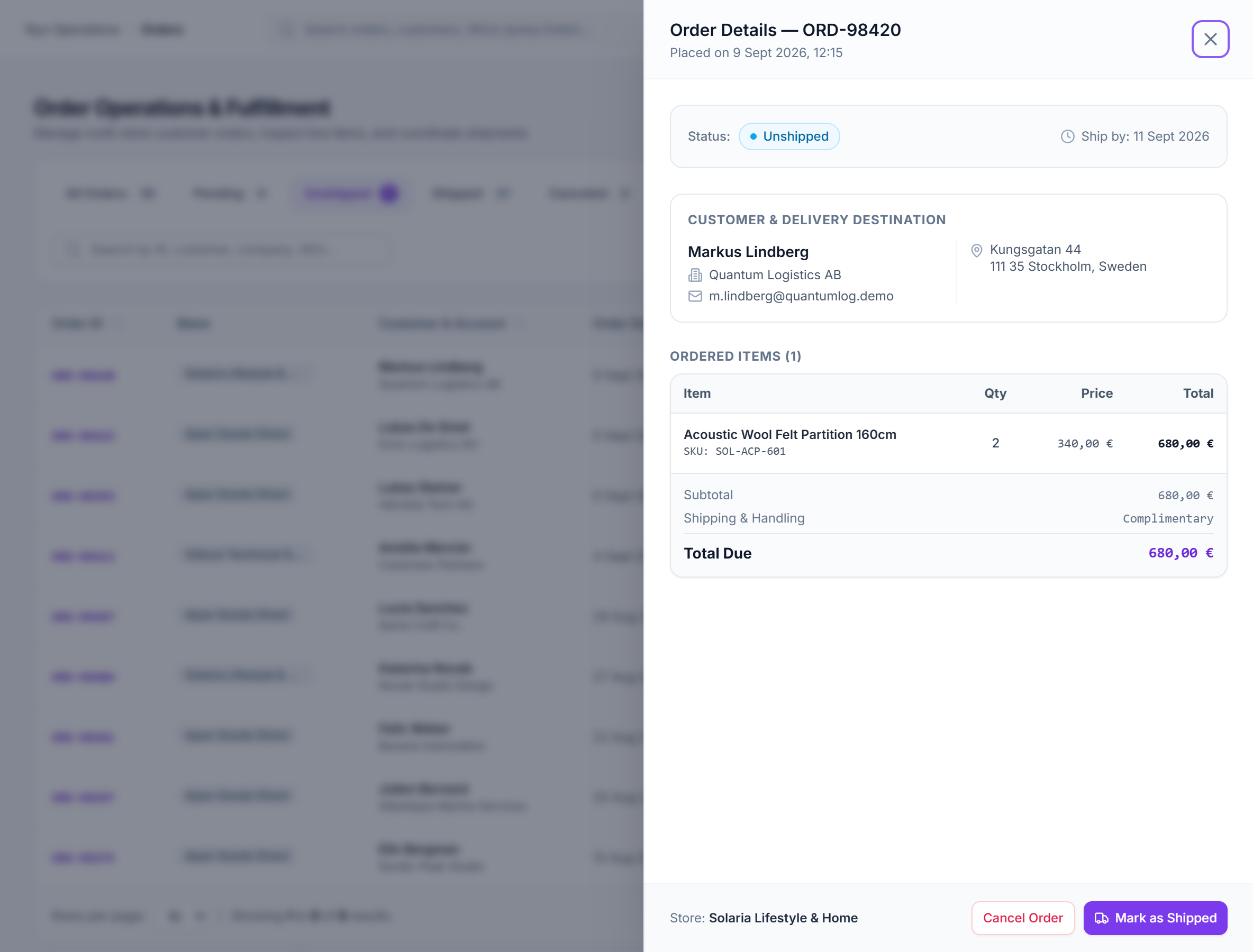
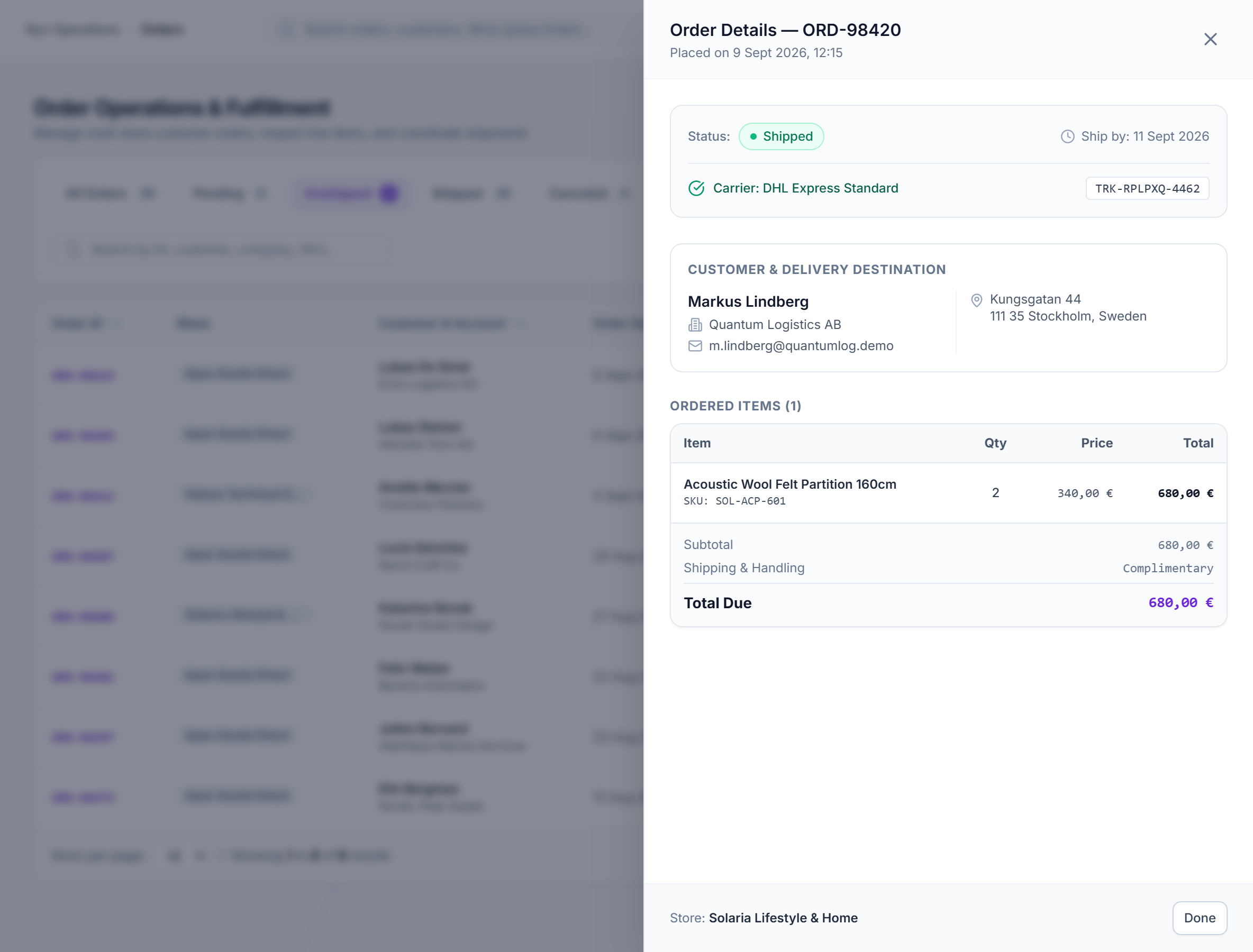
ORD-98420 opens in a drawer while the filtered list stays visible behind it.
Updated State
Marking the order shipped changes its status, adds a generated tracking reference, and updates the fulfillment counts from the same saved demo state.
Filtered Context
The Unshipped view narrows the list to orders that still need action, while the active filters stay in the URL.
Orders workspace filtered to nine Unshipped orders, including ORD-98420.Inspect in Place
ORD-98420 opens in a drawer while the filtered list stays visible behind it.
Order ORD-98420 open in a slide-over drawer over the filtered Unshipped list, with Mark as Shipped available.Updated State
Marking the order shipped changes its status, adds a generated tracking reference, and updates the fulfillment counts from the same saved demo state.
Order ORD-98420 marked Shipped with a generated carrier and tracking reference; the filtered Unshipped list remains behind the drawer.Responsive Prioritization
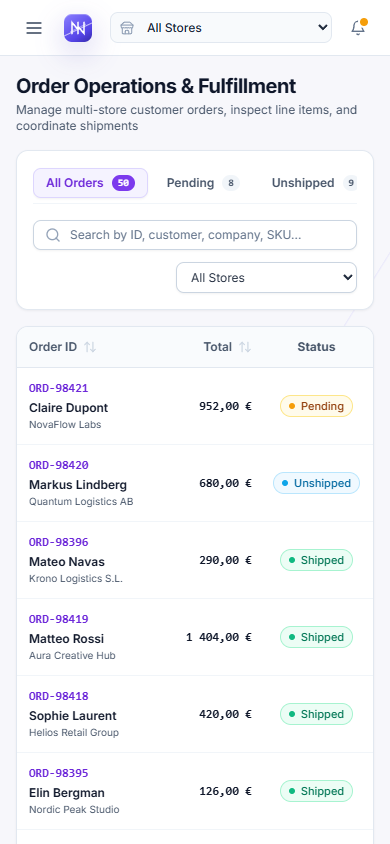
I kept the table on smaller screens instead of replacing every row with cards. Lower-priority columns disappear first, while the information needed to identify and act on an order stays visible.
What stays visible as space gets tighter.
Always visible and remains the primary order trigger.
Returns at xl when there is room for store context.
Folds into the Order ID cell on compact screens.
Returns at 2xl where the table has enough width.
Returns at lg.
Returns at xl.
Always visible.
Always visible.
Explicit action on larger screens; the row opens the order on mobile.
Built Deliberately
Most of the work here is invisible in a screenshot. Filters need to survive refreshes, order changes need to reach every view that depends on them, and the drawer has to return focus to the right place.
Shared State Refresh
Local Mutation FlowUser triggers “Mark as Shipped” in Drawer
Updates the local demo state with a short inline loading state for action feedback.
orderService.markAsShipped(id) → version++
Saves the changed order locally and increments the version counter.
React + Strict TypeScript
Keeps order, filter, and mutation shapes explicit across the app.
URL-Backed Workspace State
Search, store, status, sort, and page state live in the URL and are validated before use.
Shared State & Refresh
After an order changes, OrdersContext refreshes the derived data used by the table, counts, sidebar, and overview.OrdersContext
Service Layer
orderService.ts owns filtering, sorting, pagination, KPI calculations, and local order mutations.orderService.ts
Persistence & Loading
localStorage keeps demo changes between reloads, while routes and charts are loaded only when needed.localStorage
Status uses both text and color, with contrast checked for every badge.
#047857 on #ecfdf5NyxBoard itself uses a light, high-contrast workspace. The dark ink, violet, and cyan treatment belongs to this case study, not the product UI.
The order drawer and its confirmation dialog both need a predictable keyboard path.
- Semantic Dialogs & TablesNative table structure and labelled dialog semantics stay intact instead of being rebuilt from generic divs.
- Keyboard Navigation & Skip LinkOrders can be opened without a mouse, Escape dismisses the active layer, and the app shell includes a skip link.
- Focus RestorationClosing the drawer returns focus to the order that opened it; closing the confirmation returns focus to its trigger.
- Reduced MotionDrawer transitions and charts respect prefers-reduced-motion.
prefers-reduced-motion - Accessible ChartsCharts expose concise text summaries instead of relying only on SVG visuals.
What worked
I would keep the queue at the centre of the product. The overview helps spot work, but the table and drawer are where an order is actually reviewed and updated.
NyxBoard is still a front-end project. The data is seeded, persistence happens in the browser, and authentication is simulated. A real version would need a proper backend, real permissions, and integrations with the systems behind the interface.
Backend API
Move order data and updates out of orderService.ts and into authenticated API endpoints.orderService.ts
Server-side data
Handle filtering, sorting, and pagination on the server once the dataset gets too large for the browser.
Permissions
Control who can ship, cancel, or export orders instead of giving everyone the same demo access.
Real integrations
Replace the generated shipping states with actual carrier or commerce events.